
Cline offers StepFun Step 5 Preview free for a limited time via cline-free

With a Cline account, set the provider to Cline and pick the FREE-tagged Step 5 Preview (model ID cline-free/step-5-preview). It is StepFun's flagship agentic model with 600B total / 27B active parameters and a 1M-token context window, offered as a rotating free promotion with a usage quota in the IDE extension and CLI only.
The briefing
Cline has added StepFun's new flagship Step 5 Preview to its free model list. Anyone with a Cline account can use it in the IDE extension or CLI until the free quota runs out.
What you can use
The model name is Step 5 Preview, and the model ID is cline-free/step-5-preview. Free models rotate over time, and each account gets a limited free quota. This free window lasts one week, starting October 8 and expected to end around October 15.
On OpenRouter the same model is listed at $1 per million input tokens and $2.70 per million output tokens; on Cline you pay nothing while the free promotion runs. After the free quota is used up, you can continue with ClinePass at $9.99 a month, or switch to Cline usage-billing.
Specs and public benchmarks
Step 5 Preview is StepFun's flagship model for agentic work. It uses a sparse mixture-of-experts architecture with 600B total parameters and 27B active per token. The model supports a 1M-token context window and up to 64K output tokens, accepts text, image, and video input, and supports tool calling, JSON Schema structured output, and low / medium / high reasoning effort. It targets software engineering and professional knowledge work, with a particular focus on finance. StepFun plans to release open weights on October 15.
In StepFun's published results, Step 5 Preview scores 67.7 on DeepSWE v1.1, 80.5 on ProgramBench, 49.0 on StepCodeBench, and 66.4 on FrontierFinance. All four are ahead of Kimi K3 and GLM-5.3; on the coding benchmarks it still trails GPT-6 Astra and Claude Opus 5, while on FrontierFinance it beats GPT-6 Astra. It scores 44 on the Artificial Analysis Intelligence Index.
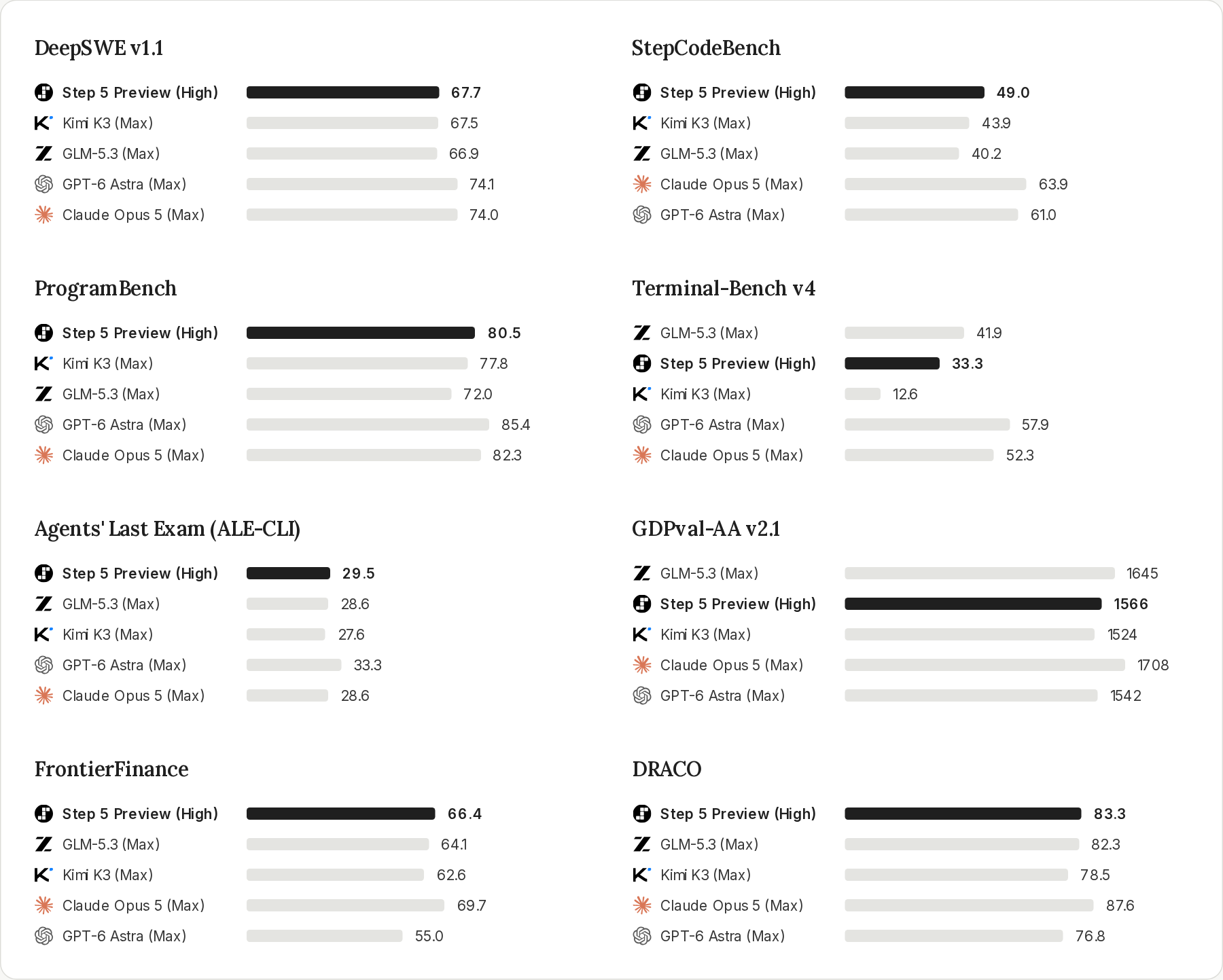
More detail: StepFun Step 5 Preview, StepFun platform docs, OpenRouter model page.
How to use it
- Open the Cline IDE extension or CLI and sign in with your Cline account.
- Set the API provider to Cline (usage-billing), then pick the FREE-tagged Step 5 Preview, or select
cline-free/step-5-previewdirectly. - During promotional periods, free models may also appear under the ClinePass provider.
Free models are not available through the Cline API—only in the IDE extension and CLI. Free usage may be used to help improve model performance and quality.
Details: Cline Free Models.