
OpenCode Zen offers StepFun Step 5 Preview free for one week

OpenCode Zen just added Step 5 Preview Free, billed at $0 for input, output, and cached reads. StepFun is running a one-week free window starting October 8, expected to end around October 15. The model has a 1M-token context window, reads images and video, and supports tool calls.
The briefing
OpenCode Zen added StepFun's flagship agentic model Step 5 Preview Free (model id step-5-preview-free) on October 8. Anyone with a Zen account can call it at no cost. StepFun is offering one week of free access, and the same window also covers tools such as Cline and Kilo Code.
What you can use
Input, output, and cached reads on Step 5 Preview Free are all billed at $0. The free window started on October 8 and is expected to end around October 15. The model provider follows a zero-retention policy and does not train on your requests.
On OpenRouter the same model is listed at $1 per million input tokens and $2.70 per million output tokens, so you skip that cost while the free window lasts.
Specs and public benchmarks
Step 5 Preview is a sparse mixture-of-experts model with 600B total parameters and 27B active per token. It supports a 1M-token context window and up to about 64k output tokens, reads text, images, and video, and supports tool calls and reasoning. StepFun positions it for software engineering and professional knowledge work, with financial analysis as a focus, and plans to release the weights on October 15.
In StepFun's published results, Step 5 Preview scores 67.7 on DeepSWE v1.1, 80.5 on ProgramBench, and 66.4 on FrontierFinance, ahead of Kimi K3 and GLM-5.3 on each. It scores 44 on the Artificial Analysis Intelligence Index.
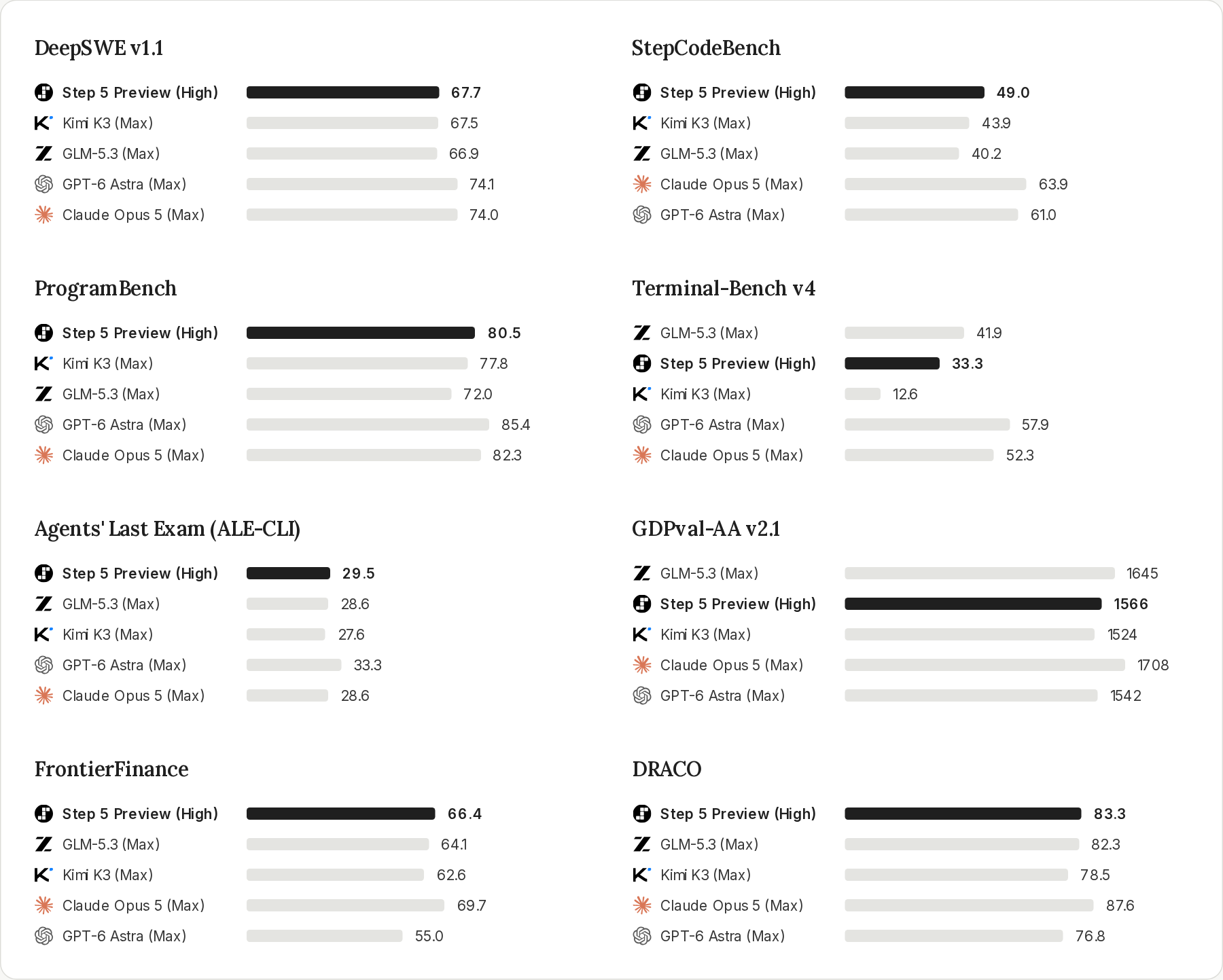
More details: StepFun Step 5 Preview · StepFun platform docs · StepFun's announcement.
How to use it
- Open OpenCode, sign in to Zen, and switch to Step 5 Preview Free with
/models, or set the model toopencode/step-5-preview-freein your config. - For API calls, use the Zen endpoint
https://opencode.ai/zen/v1/chat/completionswith modelstep-5-preview-free.
Docs: OpenCode Zen · Zen models API.